

Do you want to turn your favorite website into a mobile app for your phone or computer? With Google Chrome, you can use the "Save Page As an App" tool to install a website as an app. This opens a specific webpage or install a website's progressive web app (PWA). These can be pinned to your taskbar or simply add it to your phone's 'Home Screen' for quick access.
I will show you how to create a desktop app shortcut for any website on your device.
STEP 1) Open a website in Google Chrome. Most devices should already have Chrome preinstalled. If you don't have it installed, you can easily download it.
Type in the browser window the webpage you would like to save. Here we will use https://www.bdasocial.com as an example.
STEP 2) Click  This will be in the top-right corner.
- A drop-down menu will open.
STEP 3) Hover over Save and share. You can find this below Find and edit.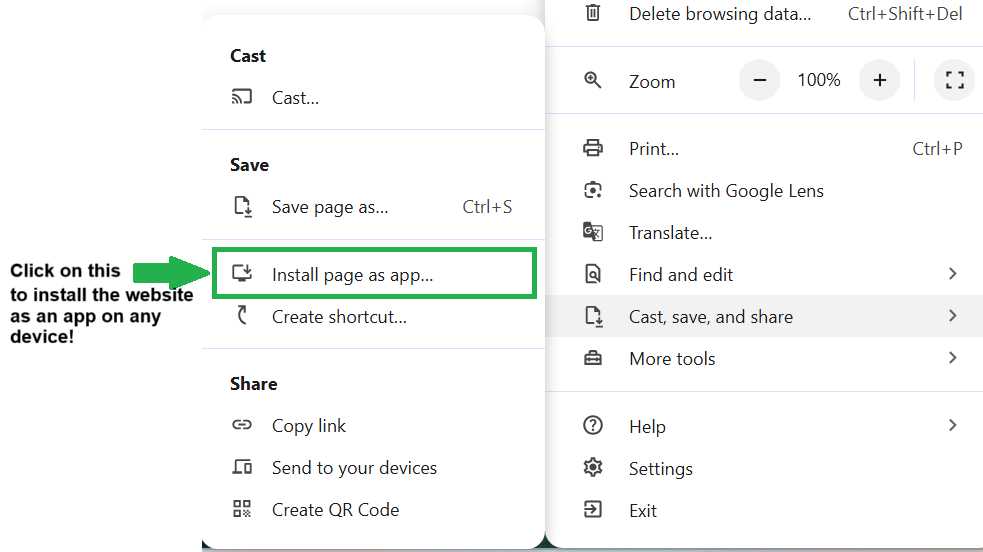
STEP 4) Follow the instructions above and the onscreen prompts to save the website (Bdasocial.com) page as an app and you're all set! This is what our app should look like on your phone or device (minus my background image).

Let me know how it works for you by sharing your screenshot in the comments. 🙂